
Student Email Signature Guide for 2026
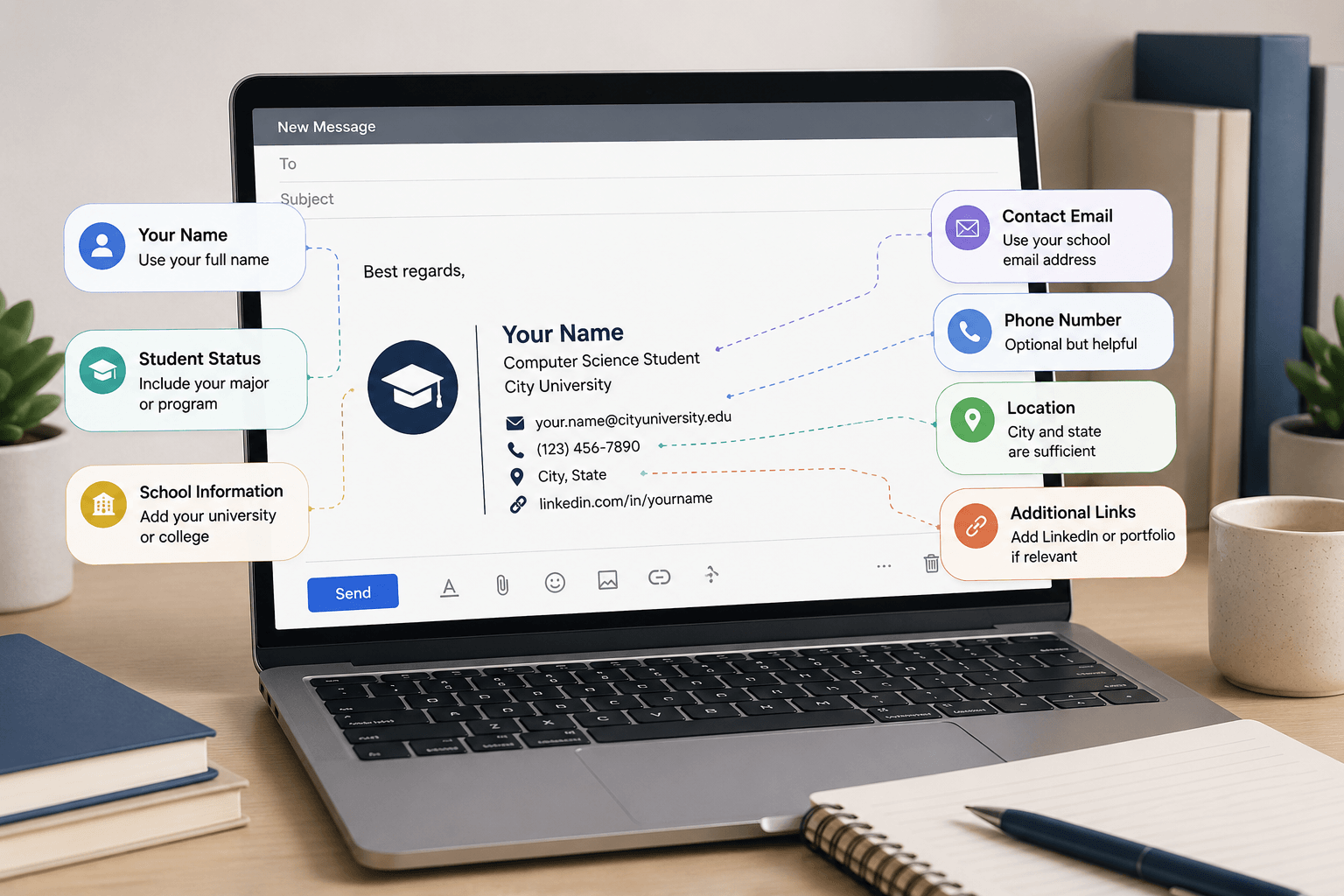
Most students either skip the email signature entirely or copy a generic professional template that does not fit their situation. Both approaches miss the point. A student email signature serves a different purpose than a corporate one. It is not about authority or brand. It is about giving professors, recruiters, and contacts the context they need to understand who you are and how to reach you.
This guide covers exactly what to include at each stage of your academic career, what to leave out, and how to set it up in under five minutes.
Why a Student Email Signature Matters
When you email a professor from a class of two hundred students, your signature is the fastest way to give them the context they need. When you reach out to a recruiter at a career fair follow-up, your signature tells them immediately where you are in your studies and how to find your work online.
A missing signature forces the recipient to either guess or ask follow-up questions. A well-written one removes that friction entirely.
The standard for students is lower than for professionals. You do not need a logo, a headshot, or a scheduling link. You need a few lines of clear, accurate information.
What to Include in a Student Email Signature
Your full name. Use the name you go by professionally, not a nickname. If your legal name is different from the name you use day-to-day, use the name you want professors and employers to call you.
Your year and major. This is the most important contextual element. It tells the recipient immediately where you are in your academic journey. A first-year student asking about research opportunities is a very different conversation from a senior asking the same question.
Your university. Include the full name of your institution, not just the abbreviation. Not everyone knows every acronym.
Your email address. Always use your university email for academic and professional correspondence. A personal Gmail address with a casual username makes a poor impression. If you only have your personal address, consider creating a professional one with just your name.
LinkedIn profile. A LinkedIn link is the single most useful addition to a student signature. It gives the recipient access to your full academic background, work experience, and skills without requiring you to attach a resume to every email.
Portfolio link if relevant. Design, writing, engineering, and research students benefit from including a portfolio or GitHub link. Only include it if the work is current and complete enough to be seen.
What to Leave Out
Your GPA. It belongs on a resume, not a signature. If it is strong, include it where it will be evaluated in context.
Your high school. Once you are in university, your high school is no longer relevant.
Your phone number in most cases. For general academic email, a phone number is unnecessary. Include it only when you are actively applying for internships or jobs and expect calls from recruiters.
Inspirational quotes. They distract from the information the recipient actually needs.
Multiple social media links. Unless every platform is professionally relevant to your field, stick to LinkedIn and a portfolio. A link to your Instagram or Twitter is rarely appropriate in academic or professional email.
Student Email Signature Examples by Stage
First and Second Year Undergraduate
At this stage, your email signature should be simple. You are still building your academic record and may not have much to link to yet.
Example:
Maya Okonkwo Freshman | Business Administration University of Southern California maya.okonkwo@usc.edu linkedin.com/in/mayaokonkwo
This gives the recipient everything they need. The year is explicit so the professor knows your level. The major is clear. The LinkedIn link is included even at this stage because building your profile early is valuable.
Third and Fourth Year Undergraduate
By junior and senior year, you may have research experience, internships, or a portfolio worth linking to. Your signature can reflect that.
Example with portfolio:
Ryan Castellano Senior | Computer Science, Minor in Statistics University of Michigan, Class of 2026 ryan.castellano@umich.edu linkedin.com/in/ryancastellano GitHub: github.com/ryancastellano
Example without portfolio:
Fatima Al-Rashid Senior | Political Science and International Relations Georgetown University fatima.alrashid@georgetown.edu +1 (202) 334-7821 linkedin.com/in/fatimaالرشيد
The phone number is included in the second example because a senior actively applying for jobs should make it easy for recruiters to reach them by phone.
Graduate Students and PhD Candidates
Graduate students should include their department and lab or research group when relevant. This context matters in academic correspondence because it signals your area of specialization and your advisor relationship.
Master's student:
Eli Nakamura MS Candidate, Data Science | Columbia University, Class of 2026 eli.nakamura@columbia.edu linkedin.com/in/elinakamura
PhD student:
Dr. in progress: Amara Diallo PhD Candidate, Molecular Biology | Johns Hopkins University Advisor: Prof. Christine Yu | Cell Signaling Lab amara.diallo@jhu.edu scholar.google.com/citations?user=amaradiallo
The Google Scholar link is appropriate for PhD students who have publications or conference presentations. It gives academic contacts direct access to your research output.
Teaching assistant:
Jonas Weber Teaching Assistant, Introduction to Economics PhD Student, Economics | Princeton University jonas.weber@princeton.edu Office Hours: Tuesdays 2 to 4pm, Room 312 Fisher Hall
Including office hours in a TA signature is genuinely useful for students emailing their TA. It reduces the back-and-forth of scheduling and signals organization.
Recent Graduates
Once you have graduated, update your signature immediately. The transition from student to professional is reflected in how you present yourself in email.
Recent graduate actively job searching:
Priya Sharma BA Psychology, University of Texas at Austin, May 2026 priya.sharma@gmail.com +1 (512) 778-4430 linkedin.com/in/priyasharma | Portfolio: priyasharma.com
The graduation date is kept in the signature for the first six to twelve months after graduation. After that, drop it and move to a fully professional signature format once you have a job title to include.
How to Set Up Your Student Email Signature in Gmail
Most universities use Gmail through Google Workspace, so this applies to the majority of students.
Step 1: Open Gmail and click the gear icon in the top right corner.
Step 2: Click See all settings at the top of the quick settings panel that opens.
Step 3: Stay on the General tab and scroll down to the Signature section.
Step 4: Click Create new, give your signature a name such as "University" and click Create.
Step 5: Type your signature in the editing box. Use the toolbar to adjust the font and size. Match the font and size to your email body for a consistent look.
Step 6: Under Signature defaults, set your new signature as the default for New emails. You can choose a shorter version or no signature for Replies.
Step 7: Scroll to the bottom of the General tab and click Save Changes. Gmail does not auto-save, so this step is required every time you make changes.
How to Set Up Your Student Email Signature in Outlook
Some universities use Microsoft 365 and Outlook for student email.
Step 1: Open Outlook and click New Email to open a compose window.
Step 2: Click Insert in the ribbon, then Signature, then Signatures.
Step 3: Click New in the Signatures and Stationery window.
Step 4: Give your signature a name and click OK.
Step 5: Type your signature in the editing box and format it using the toolbar.
Step 6: Under Choose Default Signature, assign your signature to your university email account and set it as default for New messages.
Step 7: Click OK to save.
Formatting Your Student Email Signature
Keep the formatting simple. The goal is clarity, not design.
Font: Use the same font as your email body. Arial, Calibri, or the default Gmail font all work well. Avoid decorative fonts.
Size: Your name can be slightly larger than the rest of the signature, around 11 to 12 points. Contact details can be 10 points.
Color: Plain black text is fine for most contexts. If you want to add a touch of color, limit it to your name only and choose something subtle. Avoid using your school colors unless your signature is explicitly representing the university.
Length: A student signature should be no longer than five lines in most cases. If you are adding a portfolio and LinkedIn link, six lines is acceptable.
Line spacing: Keep it tight. Each element goes on its own line without extra blank lines between them.
Building Your Student Email Signature
If you want a cleaner, more structured result than typing directly into Gmail or Outlook, use an email signature generator. You enter your details, choose a layout, and copy the formatted result into your email settings.
ReverseToolkit's email signature generator works in your browser without an account or any cost. It is designed for quick setup and produces output that copies cleanly into both Gmail and Outlook. You can create your student signature at ReverseToolkit Email Signature Generator.
Frequently Asked Questions
Should a student use a university email or a personal email for their signature?
Use your university email for all academic and professional correspondence while you are enrolled. It immediately establishes your institutional affiliation and is more credible than a personal address for reaching out to professors, researchers, and recruiters. After graduation, transition to a professional personal email address.
What should a college student put in their email signature?
Full name, year and major, university name, university email address, and a LinkedIn profile link. Add a portfolio or GitHub link if you have relevant work to show. Keep the phone number optional unless you are actively recruiting.
Is a student email signature necessary for emailing professors?
It is not required, but it is strongly recommended. Professors receive dozens of emails each day from students across multiple courses. A signature that includes your name, year, and major gives the professor immediate context and makes it easier for them to respond helpfully.
When should a student update their email signature?
Update it at the start of each academic year when your year changes. Update it immediately when you change your major or add a minor. Update it when you graduate and are transitioning to a professional format.
Can a student include their GPA in their email signature?
No. GPA belongs on a resume where it can be evaluated alongside other qualifications. Including it in a signature looks unusual and puts a single number in front of people who have no context for evaluating it.
A student email signature does not need to be elaborate. It needs to be accurate, current, and complete enough to give the recipient the context to respond to you appropriately. Set it up once, update it as your details change, and let it do its job in the background of every email you send.